iSilhouettes in Photoshop

May 11th, 2008

Creating iPodesque Silhouettes

1) Shoot a silhouette. Raw file flexibility will make this process much faster, but even a point and shoot camera will do. Do NOT rim lite the subject as you want the harsh edges from a total silhouette.

2) Add an S-Curve to increase contrast. This makes it easier to edit.

3) Using the magnetic lasso, trace the body. Adjust the “frequency” (pixels between anchor points) until you capture details like hair, but otherwise have smooth lines.

4) Fill the person-shaped selection with 100% white.

5) Add a drop shadow with a spread of 100% and distance 0. The radius will be the thickness of the outline, so experiment until you like what you see. I’ve reduced the opacity to 75% to allow the color added in the next step to show in the outline as well as the background.

6) At this point you can use the brush, eraser, or other tool to reshape the body. In two of these images I’ve repositioned limbs which didn’t look right in silhouette. The Shift button is your friend here, click on a point, hold shift and click on a second point and a line will be brushed (or erased).

7) Add a Hue/Saturation Adjustment Layer set to Colorize. I’ve found saturation set to 25 gives a very appealing pastel color. If you’re doing multiple images experiment with Hues which are spaced 90 degrees apart. The hue of the three featured images in this post are 0, 90, 270.

8) Select All, then Select > Modify > Contract. This width will become your frame.

9) Fill the frame-selection with 100% white.

The Virtual Future of Still Images

April 20th, 2008

Moving Past Analog Analogies

The first wave of development in digital photography was a struggle to replace film in quality and use. Now that it has, a new wave of development will push photography into new places and redefine still image creation. Digital Photography is about twenty years old; it’s acne is gone and its about time to move out of the family house, and become its own medium.

Photoshop has already begun this transition. Most features of Photoshop replace analog tools such as airbrushing and dodging and burning. Even seemingly new tools such as Unsharp Mask and Liquify have analog origins. But tools such as HDR move past the imaginings of the analog world into entirely new techniques possible only in a digital workflow. HDR is part of the new wave in photography with entirely new way of representing photographic vision.

Four attributes of digital photography have improved rapidly since the first mainstream professional digital cameras: resolution, ISO, burst-capture speed, and dynamic range (hereafter: DR). New workflows will arise from these technological advancements and each will bring complete virtualization closer. By virtualization I mean that a particular decision, now made at the time of capture will become part of the information contained in a raw file, able to be easily and accurately changed during post.

Some of these changes may not take place for decades, but some have already taken place. Exposure is virtualized in current high-end cameras. At the time of capture a photographer has to pick a certain exposure, but contained in the raw file is enough information that the exposure can manipulated during post without artifacts.

Drastically higher ISOs, burst speeds, and dynamic range will lead to the increased virtualization of photography which will shake the very foundations of still photography. If you thought the transition from film to digital was a game-changer you ain’t seen nothing yet

Read on for my thoughts on: virtualized shutter, virtualized aperture, virtualized camera position, virtualized lighting ratios, and virtualized subject matter

Read the rest of this entry »

Whitsundays: Infrared Landscapes

October 1st, 2006

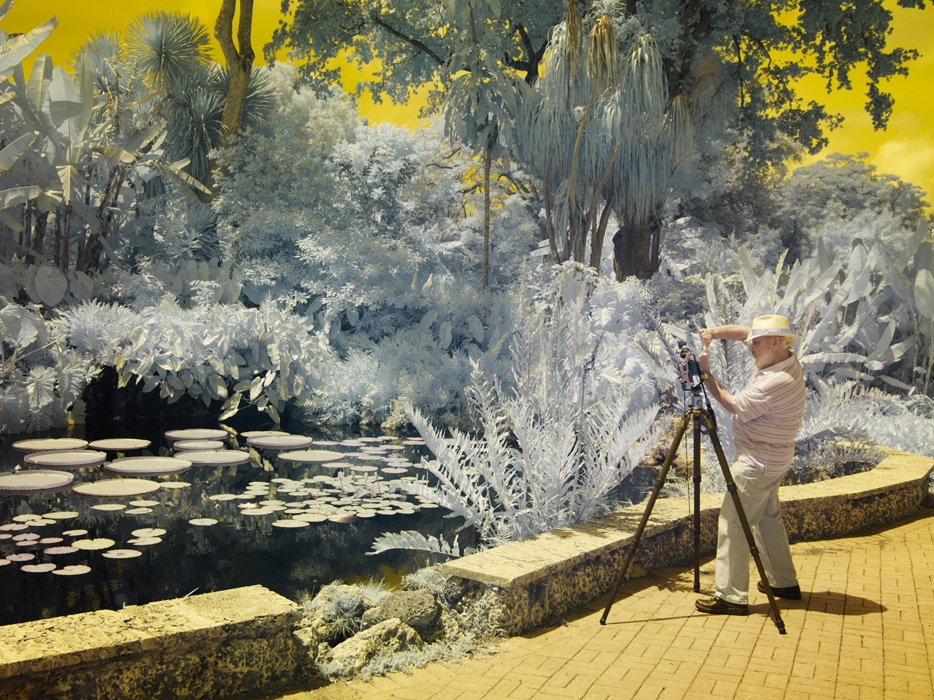
These are a few infrared images I took while at the Whitsunday Coast.

Infrared photography relies on light outside the visible spectrum. Just as a red flower is red because it strongly reflects red light, an object is brighter (or darker) in infrared photography based on how much infrared light it reflects. Foliage containing chlorophyll, which strongly reflects infrared light, is bright, while open sky, which reflects blue light but very little infrared light, is very dark. This creates an interesting reversal of tones; instead of a light sky and dark foliage, the sky is very dark and foliage glows brightly. Photographers can take advantage of this tone reversal to create an eerie or ethereal feeling.

Water Drops for Santos Energy

September 19th, 2006

Water Drops for Santos Energy

Several months ago I ran across a nerd-toy called the Time Machine. It is an external dedicated intervalometer and sensory input triggering device. In other words, it is a box which plugs into a camera and triggers a picture to be taken at set intervals and/or when a sensor (e.g. laser, motion, noise) is triggered. Seeing some of the possibilities on the Time Machine website my interest was immediately piqued. Then several weeks ago I ran across the work of Martin Waugh who uses a similar system to take pictures of splashes from water drops.

I loved the images so much that I bought a Time Machine and made my own water-drip setup. That attempt failed miserably, mainly because I tried to setup a water drip reservoir, so that drops would fall at regular intervals without intervention. For my second attempt I replaced the reservoir with a water dropper and got some decent results. Finally, I was able to setup a water dropper system that was sufficiently repeatable that I could focus on lighting and image design.

When using a water dropper to produce a single drop, water splashes are only a few millimeters across. This size creates two problems. First you need a macro lens that can focus REALLY close. Second, with a macro lens focused that closely the depth of field is often less than the width of a splash, which means precise focusing is critical. After all the effort required to perfect a water drip I wanted to make sure to capture the result in the highest practical quality. Therefore I used my Mamiya 645 Manual Focus camera with one of my favorite lenses, the Mamiya 120mm Macro. If you are so inclined, you can experiment with the numbers using an online depth of field calculator.

As it happened, just as I was perfecting the water-drop technique, my university received an invitation to submit images to a corporate client. The client had blue/white corporate colors and wanted generic images that showed energy and fit with the feel of their current website. Water drops seemed to fit the image request quite well. Shown below are the images I submitted to the client, which they accepted for a hefty sum. The return from this investment will cover the cost of a scuba diving trip around the Great Barrier Reef that I will be going on this coming week.

Use of my photos:
As a professional photographer my photographs are my life’s work.
In this case Santos Energy bought the rights to these images by paid contract, and are used here under the Portfolio Use terms of that contract. The images may not be reproduced in any form.
Leave a comment if you wish to discuss the creation of similar images

UPDATE: My submission to Santos Corporation was used on the front page of the annual Sustainability Report (an addendum to the financially-focused Annual Report). I was particularly pleased that they repeated the predominate color of the image throughout the report.